Hit record.
It records your mic and the call audio together. Nothing joins the call, so it works with Zoom, Meet, Teams or anything else.
MIC
SYSTEM
Minutes is an open-source Granola alternative that runs entirely on your Mac. It records your calls, transcribes them locally, and a model I fine-tuned takes notes while people are still talking, next to the ones you type.
$curl -fsSL https://praveenvnktsh.github.io/minutes/install.sh | bash
Most notetakers give you a summary after the call. Minutes writes notes during it, in the same doc you're typing in, and leaves your own lines alone.
It records your mic and the call audio together. Nothing joins the call, so it works with Zoom, Meet, Teams or anything else.
About every 30 seconds, at a pause, it adds topics, points and decisions, marked as AI. Type whatever you want and it won't touch your lines. Action items wait until the end.
When you stop, it writes a summary, decisions, action items with owners, and open questions from the live notes, your notes and the transcript. If the live notes skipped a stretch, it fills that in from the transcript first.
Cloud notetakers join as a guest and everyone sees it. Minutes just records the audio on your machine.
Watch the transcript come in live, or transcribe after the call if your laptop is busy.
Live notes come from Gemma 4 E2B, fine-tuned to make small edits to the notes so it keeps up with transcription on a laptop. A second adapter writes the wrap-up. Both are on Hugging Face.
Speakers are separated on-device. You can rename them and fix wrong labels.
Ask questions about the transcript and your notes, during the call or after. Answers cite timestamps in the transcript.
Transcription runs on the Neural Engine through Core ML, and the notes model on the GPU through Metal.
When a call starts, Minutes asks if you want to record it.
Full-text search across all your transcripts, stored in a local SQLite file.
Drop in an audio file and it gets transcribed in the background.
Built-in models by default, or Ollama. Claude, Groq and OpenRouter work too if you add a key.
AI lines are marked. One switch hides them, and copy and export respect it.
Big general models are too slow to run next to live transcription on a laptop, and they narrate instead of taking notes. So I fine-tuned Gemma 4 E2B (2B parameters) on the AMI meeting corpus. Both adapters are on Hugging Face.
Every 30 seconds or so it reads the notes and the latest transcript and replies with a few short edits, usually under 100 tokens. That's why it keeps up. It can't edit your lines.
At the end, a second adapter writes the summary, decisions, action items and open questions. The app checks it: numbers have to appear in the transcript, and owners are only named if someone actually said it. If it fails the check, you get a simpler wrap-up from the live notes.
Both adapters were trained on one 24 GB Mac. To fit hour-long meetings in memory for the wrap-up, the backward pass runs one layer at a time.
Audio, transcripts and notes stay on your disk. The only network traffic is downloading models from Hugging Face and checking GitHub for updates, unless you add a cloud AI key.
Transcribed on your machine.Nemotron and Parakeet run locally on the Neural Engine.
No account or telemetry.There is no analytics code in the app and nothing to sign up for.
Cloud AI only if you add a key.Then the meeting text goes to that provider, and only that one.
Open source.MIT licensed. You can read the code or build it yourself.
How it compares to a typical cloud notetaker.
| Minutes | Typical cloud notetaker | |
|---|---|---|
| Where your audio goes | Stays on your machine | Uploaded to vendor servers |
| Bot joins the call | Never | Usually |
| Account required | No | Yes |
| Works offline | Yes | No |
| Notes during the meeting | Yes, as people talk | A report after the call |
| Your own notes | Kept word for word | Replaced by a template |
| Price | Free | Monthly per-seat subscription |
| Source code | Open, MIT licensed | Closed |
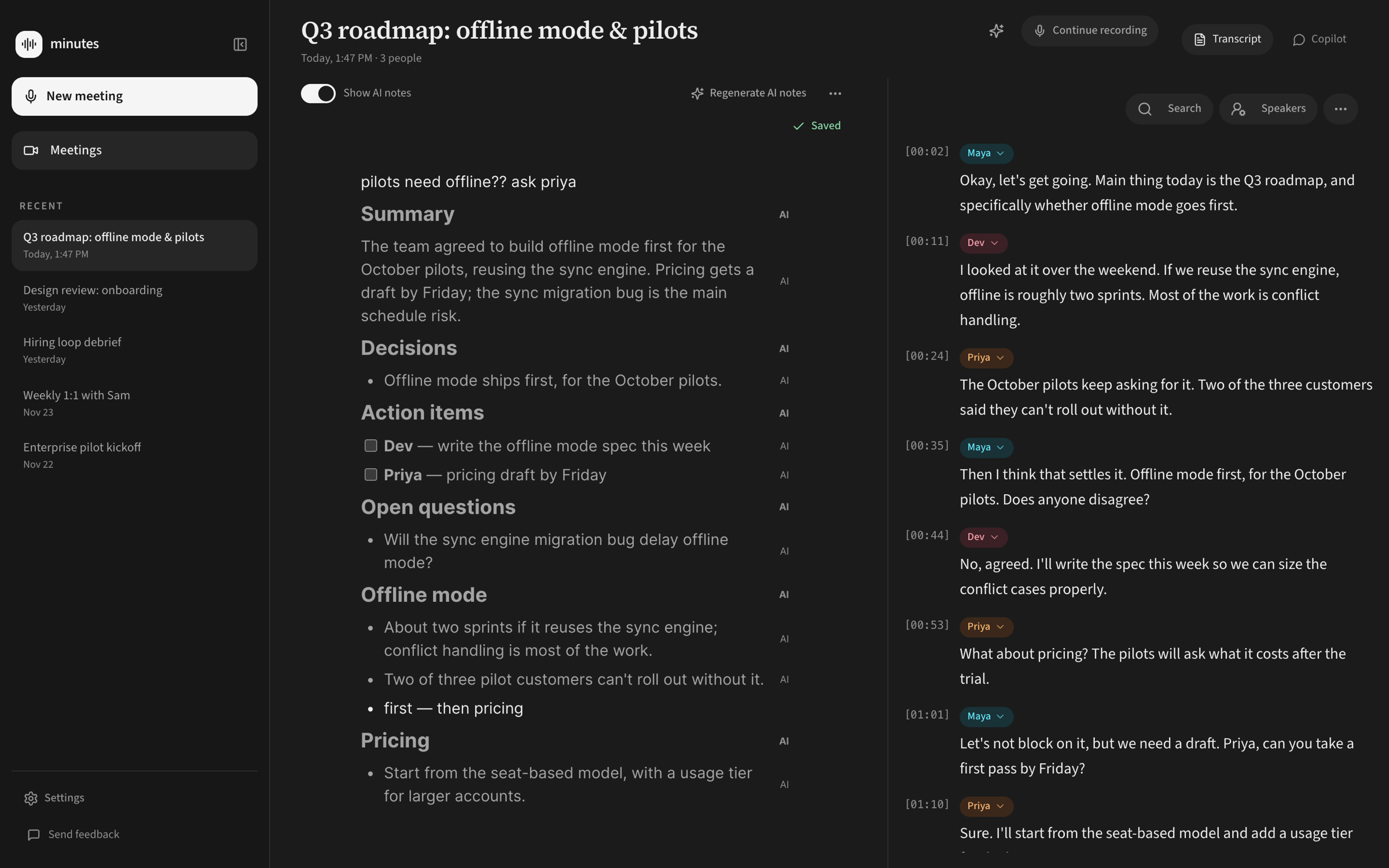
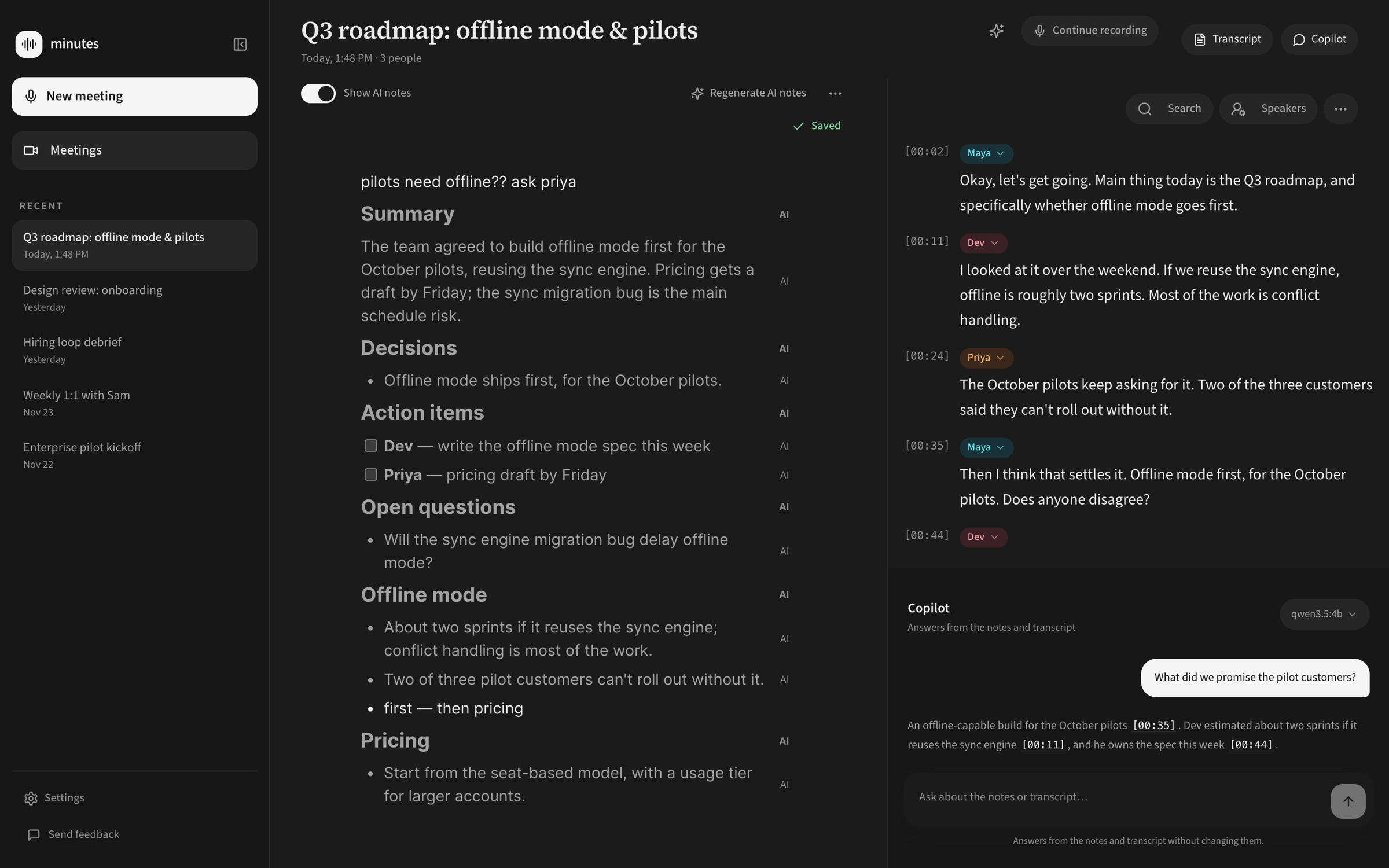
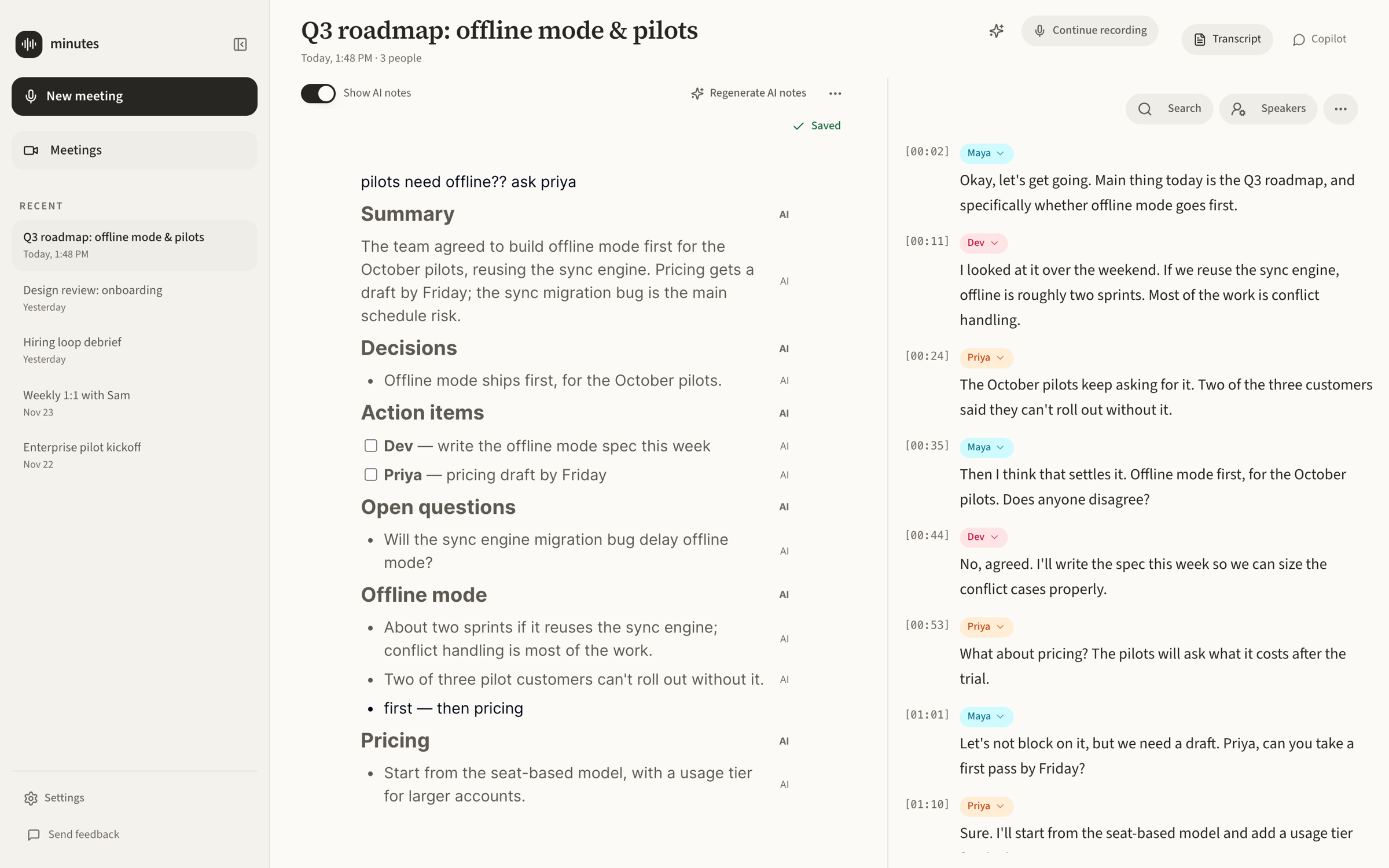
Your notes and the AI's in one document, the live transcript docked on the right. One switch hides the AI's lines.
It's free and open source, and there's no account.
$curl -fsSL https://praveenvnktsh.github.io/minutes/install.sh | bash
Paste into Terminal. It installs the latest release into Applications and opens it. Run it again to update. Read the script.
Apple Silicon Mac · macOS 15 or later (the app opens on 13 and 14, but transcription needs 15). Updates install automatically from inside the app.